
BlueOnyx AI Assistant
New side-project for BlueOnyx: An AI Assistant that can help admins troubleshoot servers, analyze logs, and eventually automate useful day-to-day tasks without turning the server into Skynet.
Updated (2026-08-07): The BlueOnyx AI Assistant has been released to the general public.
I would like to showcase a small side-project currently under development for BlueOnyx: the new AI Assistant module, internally called base-ai.mod.
Here is the SVN of the code in question: https://devel.blueonyx.it/trac/browser/BlueOnyx/5212R/ui/base-ai.mod
Purpose
The BlueOnyx AI Assistant has two primary goals.
1. AI-Assisted Troubleshooting for Server Administrators
The first goal is to provide serverAdministrator users with an AI-powered assistant that can help troubleshoot server issues through a natural-language chat interface.
Examples include:
- Mail delivery troubleshooting
- Diagnosing broken Vsites
- Investigating permission or ownership problems
- Detecting hacked or misconfigured websites
- Checking DKIM, SPF, DNS, and mail-related issues
- Reviewing logs without having to manually fight through endless
grep,awk,cut, andsedpipelines
Instead of manually filtering signal from noise, the administrator simply asks a question in plain English and the AI gathers the relevant information.
2. Encapsulated AI Functions Inside the GUI
The second goal is more interesting in the long run.
Instead of unrestricted chat interactions, the AI can also provide tightly controlled, task-specific functionality inside the BlueOnyx GUI itself.
Examples:
- An AV-SPAM page where users can select a folder containing spam messages that slipped through the filter. The AI analyzes the spam samples and generates suggested SpamAssassin rules, including false-positive checks against other mail folders.
- A “Website Health Diagnostic” button that evaluates a Vsite for bad practices, suspicious files, or signs of compromise.
- Automated analysis of logs to suggest Fail2ban or firewall rules against ongoing attacks.
And those are only the obvious starting points.
Implementation
The GUI integration places the new “AI Assistant” menu entry under:
Server Management > Programs
Currently the module contains:
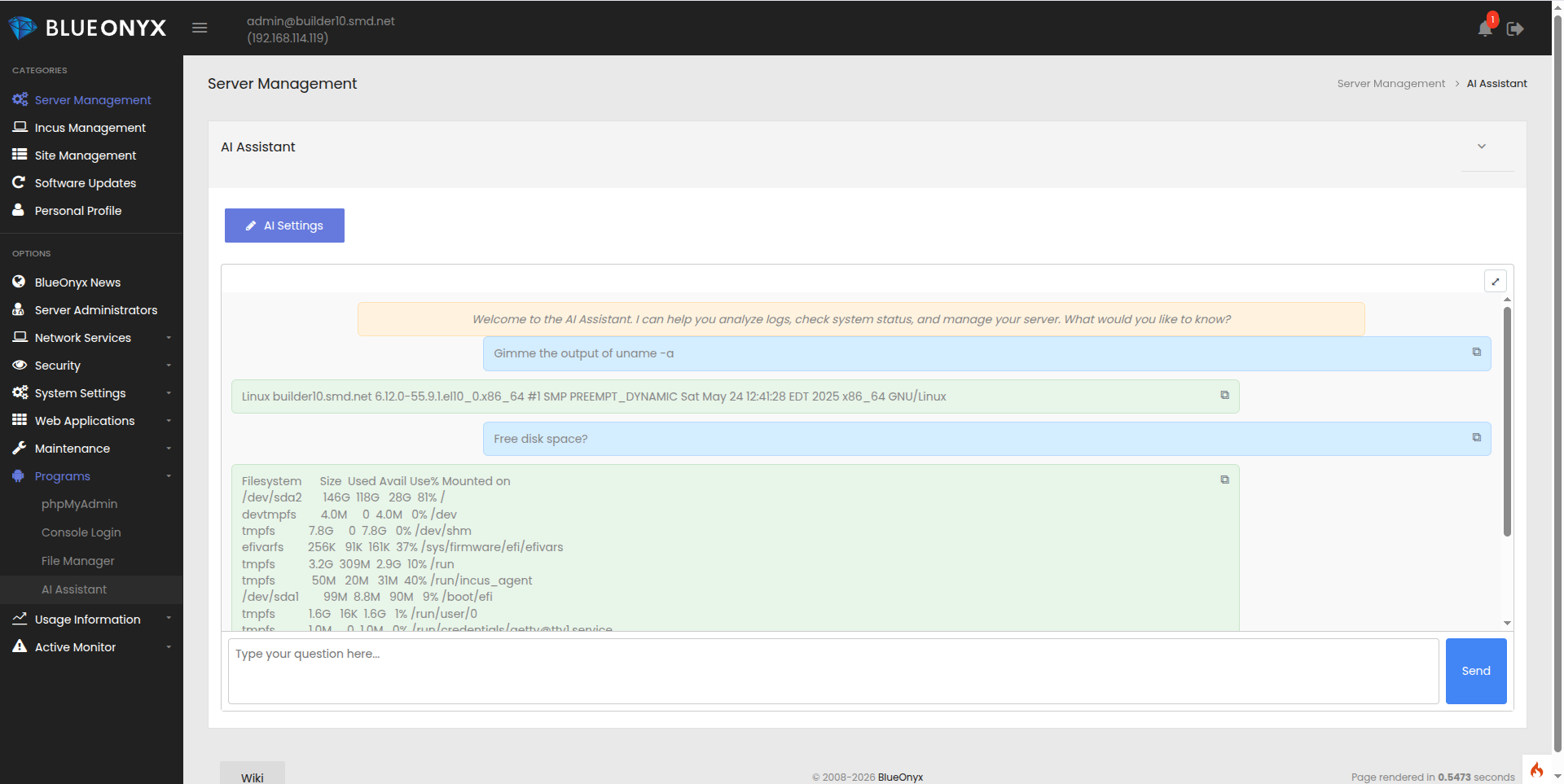
- A chat interface
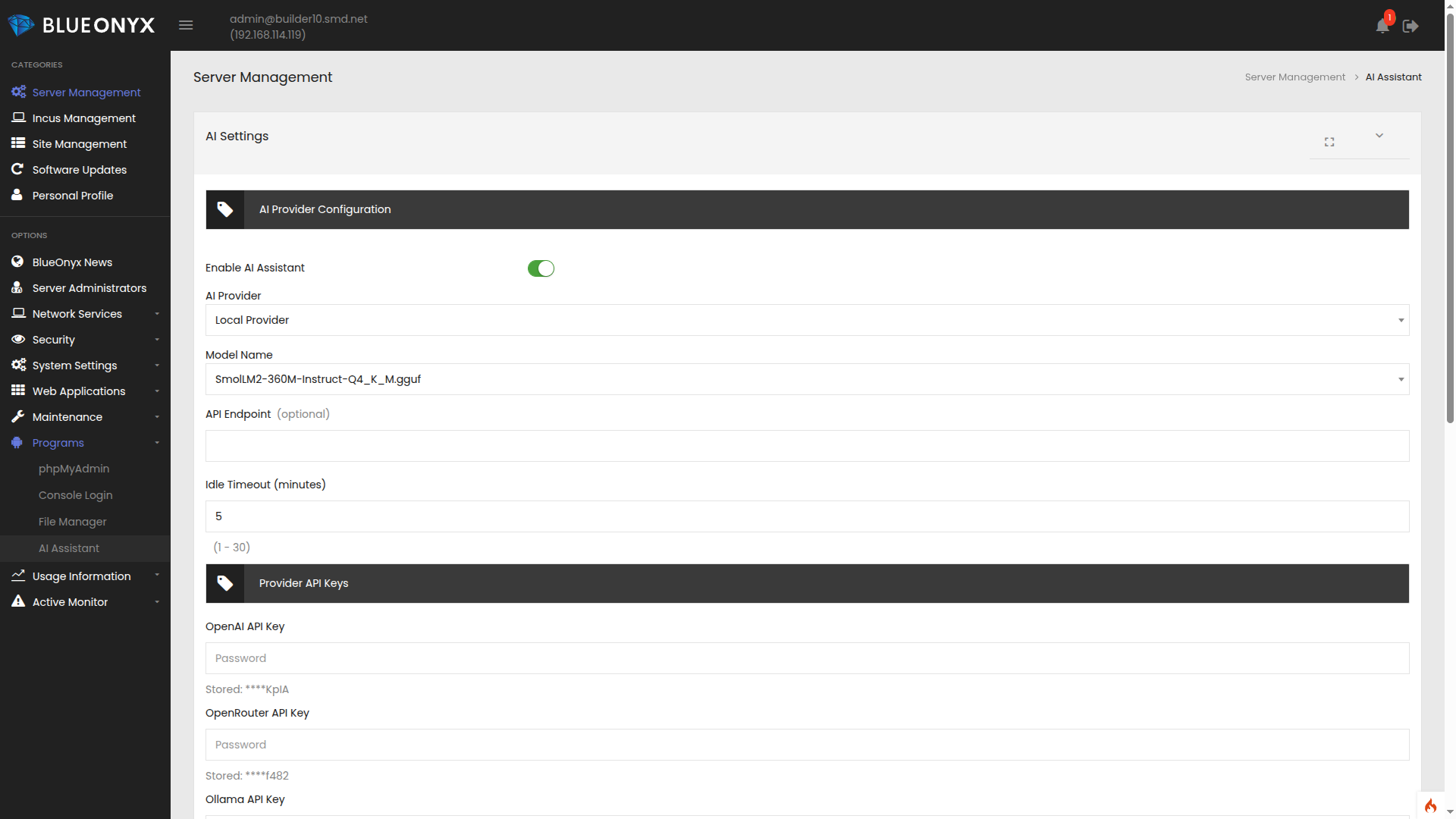
- An “AI Settings” page
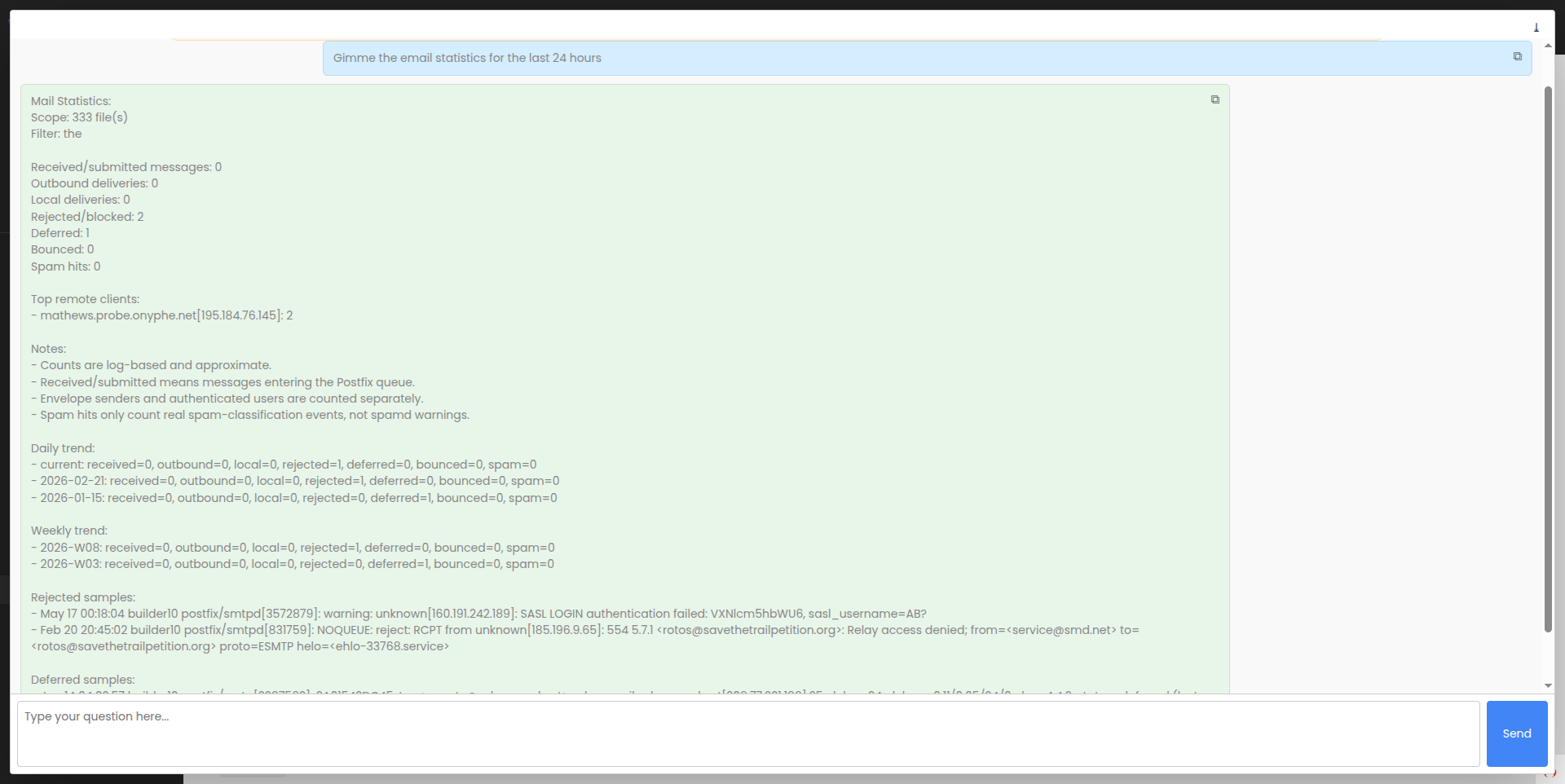
The chat page behaves similarly to modern AI chat interfaces and can be expanded into fullscreen mode for readability.
The “AI Settings” page allows administrators to enable or disable the feature. By default, the service is disabled.
Local AI Provider
By default, the AI Assistant uses a locally hosted LLM provider implemented through a self-compiled llama.cpp server with Vulkan support.
This setup supports:
- CPU-only systems
- GPU acceleration when a supported graphics card is present
- Hybrid GPU/CPU offloading for larger models
Vulkan support is admittedly not the fastest solution compared to GPU-specific builds, but it offers broad compatibility across a wide range of hardware.
The local AI service is not permanently active. It starts on demand and automatically shuts down after an idle timeout period (default: 5 minutes).
This keeps resource usage low on production systems.
Default LLM Model
The currently bundled default model is:
SmolLM2-360M-Instruct-Q4_K_M.gguf
Origin:
https://huggingface.co/HuggingFaceTB/SmolLM2-360M
To describe this model as “not exactly Mensa material” would be fair.
However:
- It is extremely small (~260 MB)
- It supports tool-calling surprisingly well
- It performs reasonably fast even without GPU acceleration
On a modest development VM, performance currently sits around 15–35 tokens per second, which is entirely usable for administrative tasks.
External AI Providers
The AI Assistant can also connect to external providers.
Supported providers currently include:
- OpenAI
- OpenRouter
- Ollama
- Anthropic
- Custom OpenAI-compatible providers
- Local llama.cpp instances
Administrators simply enter the API keys and select the preferred model from the provider.
Likewise, larger local models can be installed manually into ...
/home/ai/models/
... and selected directly through the GUI.
This also allows organizations to connect multiple BlueOnyx servers to an internal company-hosted AI system. If privacy is a must, then using a local LLM model or a specialized in-house LLM server is not only a must, but also fully supported from the start.
The provider abstraction is implemented through the excellent Python toolkit LiteLLM, which saved me from reinventing several wheels that were already rolling perfectly fine.
AI Service Security
The local LLM runs as the unprivileged user ...
blueonyx_ai
... and binds only to:
127.0.0.1:8081
Tool access is gated through:
- Sausalito ACLs
- Session validation
- Privilege-scoped execution wrappers
Currently only authenticated serverAdministrator users with valid session IDs may access the AI Assistant and tool calling is entirely gated behind stricht ACL and authentication checks.
Future functionality will allow more granular privilege separation for specific tasks.
AI Tool Usage
This is the real make-or-break point.
The AI is not allowed to execute arbitrary shell commands.
There is no universe in which giving an LLM unrestricted root shell access is a good idea.
We all know how that movie ends.
Commands such as ...
rm -Rf / --no-preserve-root
shutdown -h now
... are obviously entirely unacceptable.
But even harmless-looking commands like cat or echo can become dangerous in the wrong context.
Controlled Tooling Instead
Instead of unrestricted shell access, the AI receives access to tightly controlled tools.
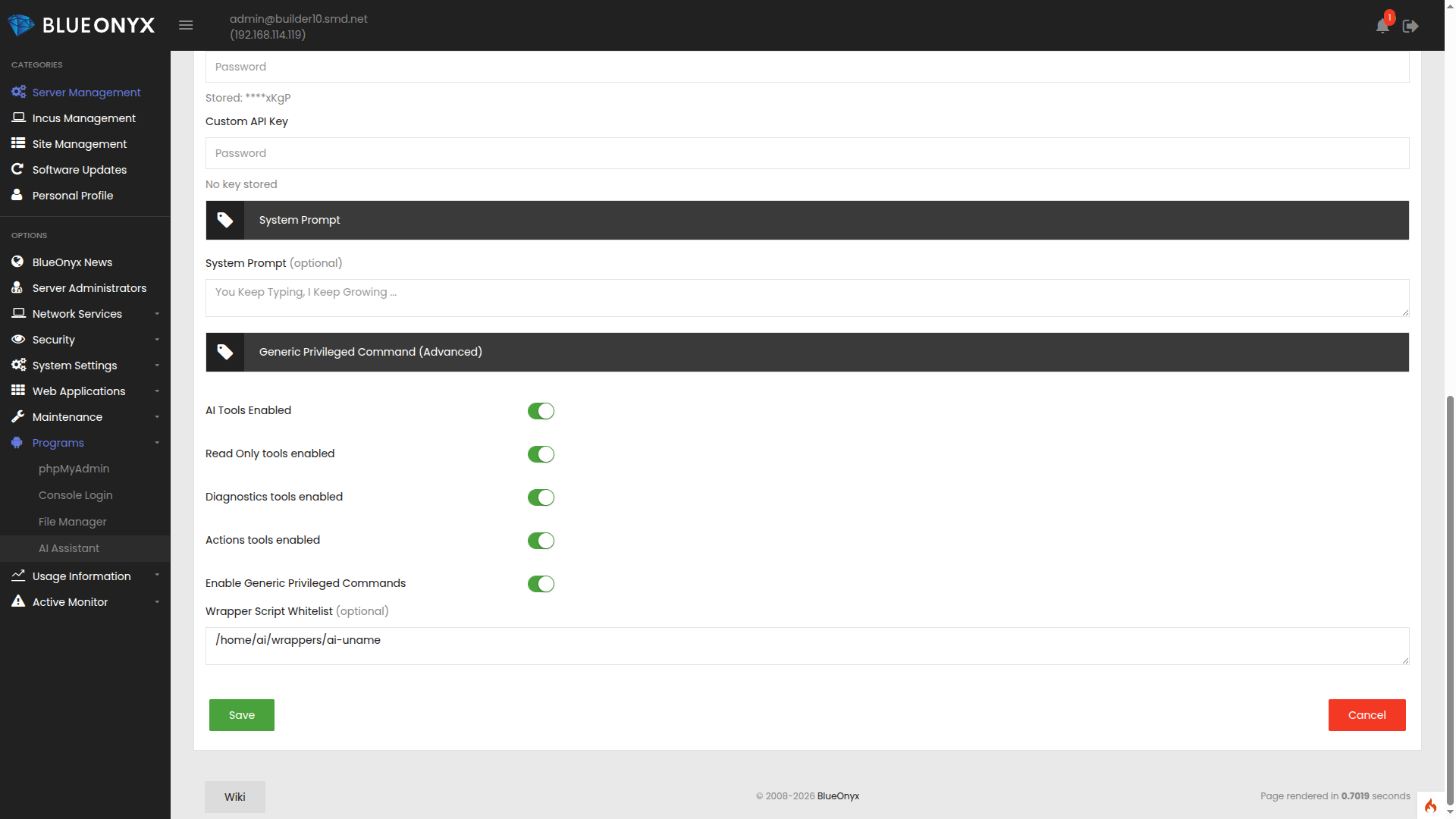
Current categories include:
read_only
  - search_logs
  - read_file
  - list_directory
  - stat_path
  - hash_file

diagnostics
  - system_info
  - system_uname
  - service_status
  - journalctl_query
  - search_files

actions
  - service_action
  - write_file
  - cce_set
  - run_privileged_command

advanced
  - specialized privileged actions/scripts
Each category can be individually enabled or disabled.
The AI receives deterministic shortcuts and predefined workflows that allow it to perform specific tasks safely and predictably.
Currently Implemented Diagnostics
- Check logs for recent errors
- Search mail logs for delivery problems
- Inspect logs for suspicious activity
- Show outbound mail statistics
- Display recent mail health reports
- Show per-user mail statistics
- Analyze disk usage and filesystem health
- Understand natural-language variations such as “Which disk is nearly full?”
Some of these patterns intentionally overlap because users rarely ask questions in identical ways.
Future Development
Additional tools and diagnostics are currently being developed to expand practical usefulness for BlueOnyx administrators.
The goal is not to build a gimmick.
The goal is to build something that actually saves administrators time.
General Chat Answers and the Hallucination Problem
The bundled local model knows essentially nothing about BlueOnyx unless explicitly instructed.
Ask it who the current US president is and it may confidently inform you that Joe Biden is still in office.
Ask it about Germany and apparently Angela Merkel is still running the place as well.
Time travel included free of charge.
More importantly: Most generic LLMs know very little about BlueOnyx itself.
Without safeguards, they will frequently hallucinate commands, configuration paths, or entirely fictional functionality.
That is unacceptable for a production server environment.
The “Canonical Truth Registry”
To solve this problem, the AI Assistant is being designed around a structured “truth chain”.
The first layer is a local “Canonical Truth Registry”.
This is essentially a searchable database containing authoritative information about BlueOnyx internals, architecture, terminology, tools, and best practices.
Example entry:
{
  "registry_version": "0.2.0",
  "purpose": "Canonical BlueOnyx truth registry for the base-ai assistant.",
  "default_rules": [
    "Prefer live tools for current state.",
    "Never guess BlueOnyx-specific paths, commands, or behaviors.",
    "Use the knowledge tool or registry before hallucinating.",
    "Keep answers concise and evidence-based.",
    "For configuration changes, require confirmation."
  ],
  "entries": [
    {
      "id": "blueonyx",
      "canonical_name": "BlueOnyx",
      "aliases": ["BlueOnyx", "BlueOnyx server platform", "BlueQuartz successor", "5210R", "5211R", "5212R"],
      "category": "core",
      "summary": "BlueOnyx is a Linux server management platform built on the Sausalito framework and the CCE/CODB configuration stack.",
      "authoritative_tools": ["search_blueonyx_knowledge"],
      "safe_answer_template": "BlueOnyx is a Linux server management platform built on the Sausalito framework and the CCE/CODB configuration stack."
    },
    {
      "id": "sausalito",
      "canonical_name": "Sausalito",
      "aliases": ["Sausalito framework", "BlueOnyx framework"],
      "category": "core",
      "summary": "Sausalito is the BlueOnyx GUI, schema, handler, constructor, and configuration framework.",
      "authoritative_tools": ["search_blueonyx_knowledge"],
      "safe_answer_template": "Sausalito is the BlueOnyx GUI, schema, handler, constructor, and configuration framework."
    },
    {
      "id": "cce",
      "canonical_name": "CCE",
      "aliases": ["CCEd", "Cobalt Configuration Engine", "configuration engine"],
      "category": "core",
      "summary": "CCE stores BlueOnyx configuration objects and triggers handlers when GUI changes are committed.",
      "authoritative_tools": ["search_admin_logs"],
      "safe_answer_template": "CCE stores BlueOnyx configuration objects and triggers handlers when GUI changes are committed."
    },
    {
      "id": "codb",
      "canonical_name": "CODB",
      "aliases": ["Cobalt Object Database", "object database"],
      "category": "core",
      "summary": "CODB is the object store behind CCE.",
      "authoritative_tools": ["search_admin_logs"],
      "safe_answer_template": "CODB is the object store behind CCE."
    },
    {
      "id": "cce_transaction",
      "canonical_name": "CCE transaction",
      "aliases": ["CREATE", "SET", "FIND", "DESTROY"],
      "category": "core",
      "summary": "CCE transactions describe object changes; failed transactions in /var/log/messages often point to the real handler or constructor problem.",
      "authoritative_tools": ["search_admin_logs"],
      "safe_answer_template": "Failed CCE transactions in /var/log/messages often point to the real handler or constructor problem."
    },
    {
      "id": "schemas",
      "canonical_name": "Schemas",
      "aliases": ["CCE schemas", "schema files"],
      "category": "core",
      "summary": "Schemas define classes, properties, validation, access rules, and handler triggers.",
      "authoritative_tools": ["search_blueonyx_knowledge"],
      "safe_answer_template": "Schemas define classes, properties, validation, access rules, and handler triggers."
    },
    {
      "id": "handlers",
      "canonical_name": "Handlers",
      "aliases": ["CCE handlers", "glue handlers"],
      "category": "core",
      "summary": "Handlers apply validated GUI changes to the underlying system and write the live config files or service settings.",
      "authoritative_tools": ["search_admin_logs"],
      "safe_answer_template": "Handlers apply validated GUI changes to the underlying system and write the live config files or service settings."
    },
    {
      "id": "constructors",
      "canonical_name": "Constructors",
      "aliases": ["constructor scripts", "bootstrap scripts"],
      "category": "core",
      "summary": "Constructors seed defaults during package install or startup.",
      "authoritative_tools": ["search_blueonyx_knowledge"],
      "safe_answer_template": "Constructors seed defaults during package install or startup."
    },
Building this registry is meticulous work.
Fortunately, “smarter” AIs can assist in generating large portions of the groundwork.
The human then only has to review, correct, and refine the results.
Deterministic Local Truths
The second layer focuses on aggressive anti-hallucination behavior:
- Tool-first workflows
- Low-temperature inference
- Strong system rules
- Deterministic retrieval chains
The AI should prefer verified local facts over creative interpretation.
This is server administration, not interpretive jazz.
Trusted External Knowledge Sources
If local information is insufficient, the AI may query trusted BlueOnyx-related resources such as:
Fallback Strategy
If the AI still cannot confidently answer a question, it should stop pretending otherwise.
At that point it should direct the user toward:
- The BlueOnyx website
- The Wiki
- The Mailing List
- Discord
- A support request or bug report
Current Status
This project is currently an early preview.
It is incomplete and still of limited practical usefulness.
At the moment it is somewhere between:
- A useful prototype
- A toy
- And a rubber duck that makes noises when squeezed
The “Truth Chain” still needs deeper implementation.
Tooling requires further refinement and expansion.
There is still a considerable amount of work ahead. For example: The small local LLM model might need restrictions to only provide "canned answers" to known topics and otherwise it rather should keep its (limited) wisdom to itself. What it does well enough is tool usage, so that is what it's primary purpose should be: Examine logs, files and service states and perhaps perform limited tasks. Smarter local or external LLM models can then be granted more freedom to use the Canonical Truths and Local Truths to provide better freeform answers instead.
Future Release Plans
Once the core functionality becomes stable and genuinely useful, the AI Assistant may be released as optional installable software.
The current idea is:
- Initial installation through a package
- Regular updates delivered through standard BlueOnyx DNF repositories
If the project proves itself valuable over time, it may eventually become part of the standard BlueOnyx installation.
At present, the complete package set is approximately 275 MB, which is small enough to fit comfortably onto the installation ISOs.
But for now?
It still needs to grow from an amusing toy into a genuinely useful administrative tool.
 |
 |
 |
 |