
BlueOnyx AI Assistant
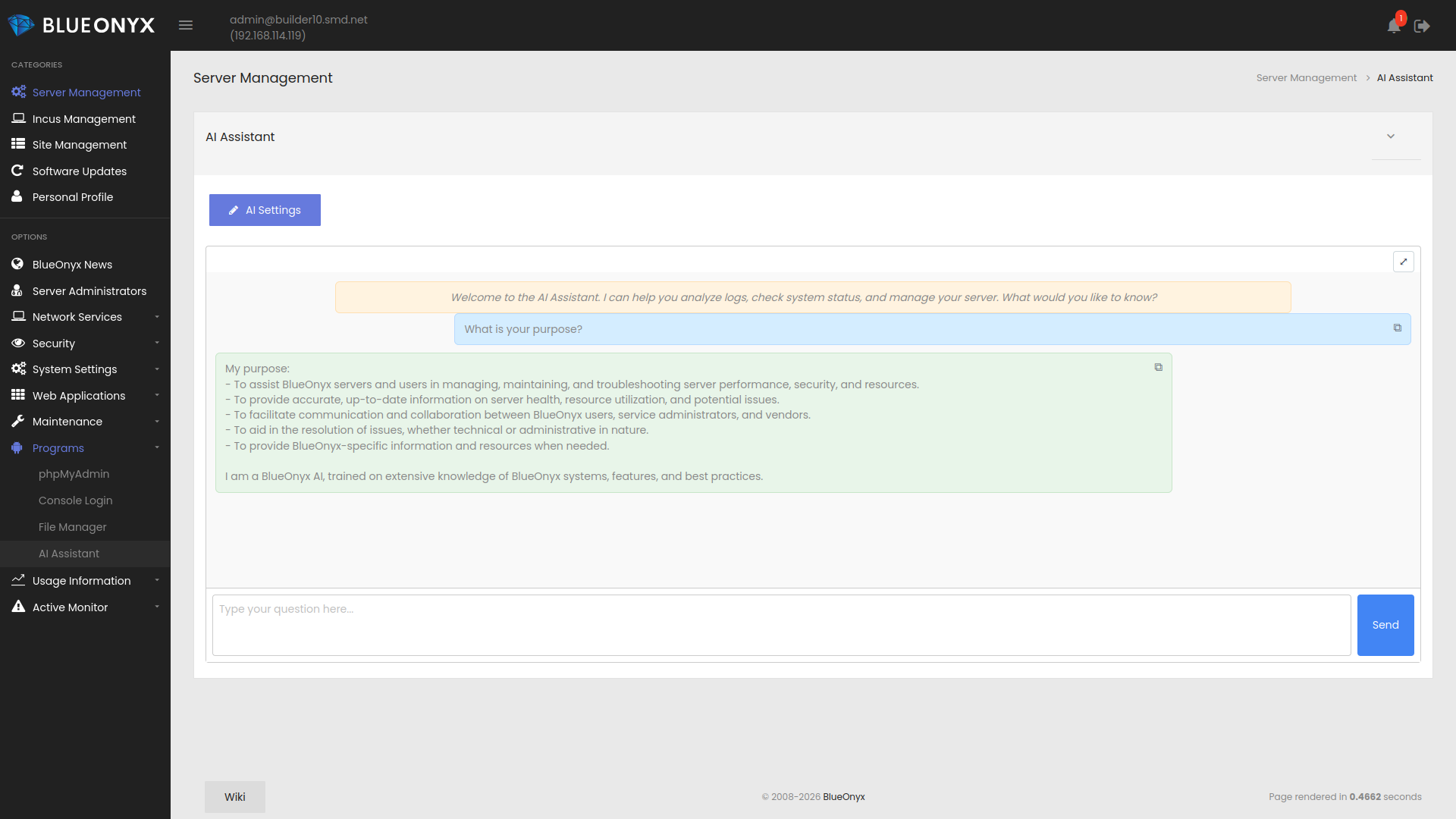
The BlueOnyx AI Assistant is an add-on module for BlueOnyx that provides an AI powered assistant inside the server GUI. It is intended to help administrators inspect, diagnose, understand, and manage their servers more efficiently.
 |
 |
 |
 |
What does the BlueOnyx AI Assistant do?
The module adds an AI chat interface to BlueOnyx. Through that interface an administrator can ask practical questions about the server and receive answers based on live diagnostics, structured helper tools, and BlueOnyx specific operational knowledge.
It is not just a generic chatbot. It includes BlueOnyx aware tooling for service inspection, log analysis, Vsite inventory, SSL checks, PHP-FPM diagnostics, web ownership verification, system resource inspection, network checks, and controlled privileged operations where allowed.
Which AI providers are supported?
The module supports local and remote providers.
By default, the AI Assistant uses a locally hosted LLM provider implemented through a self-compiled llama.cpp server with Vulkan support and the widest possible support for different hardware architectures.
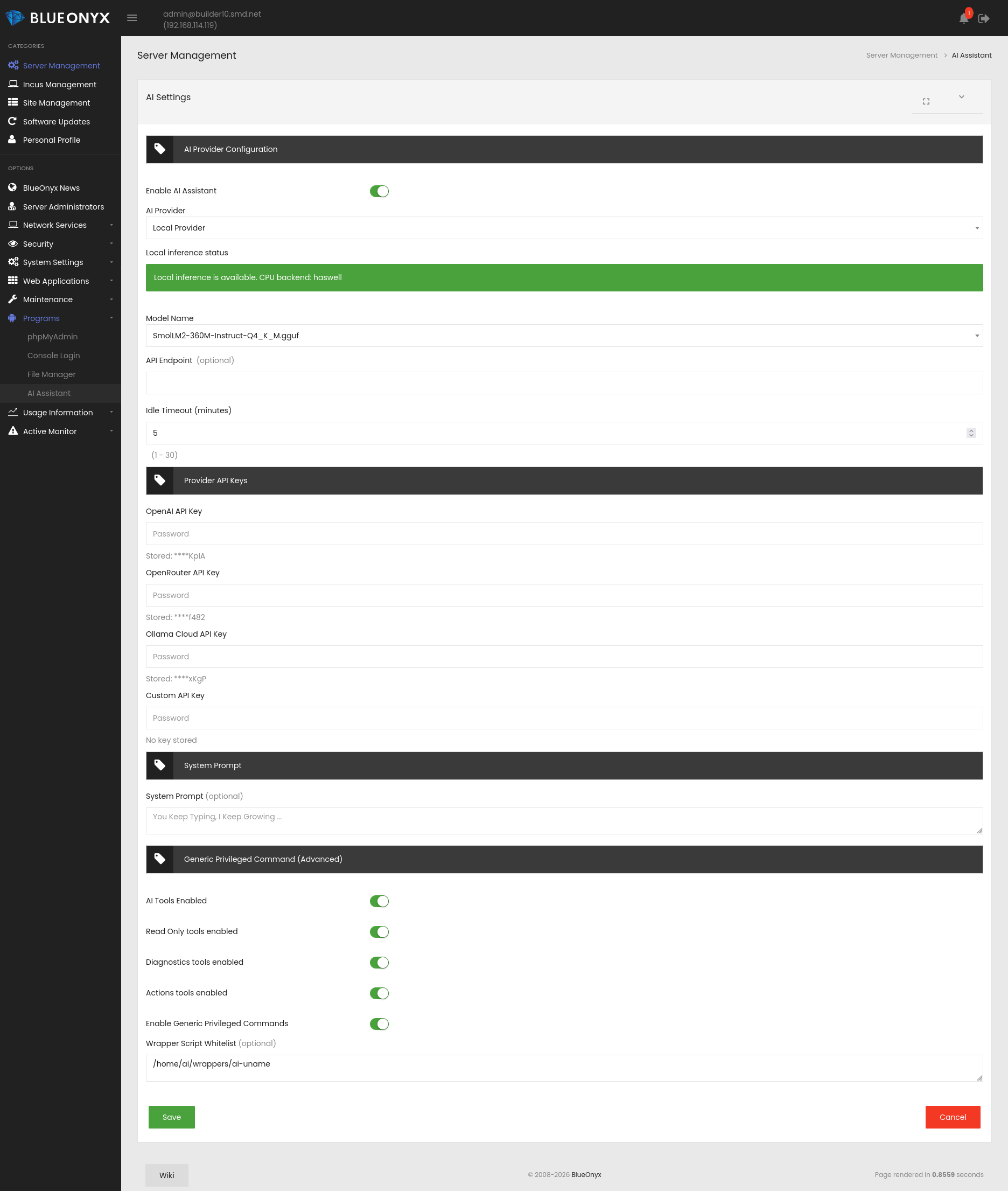
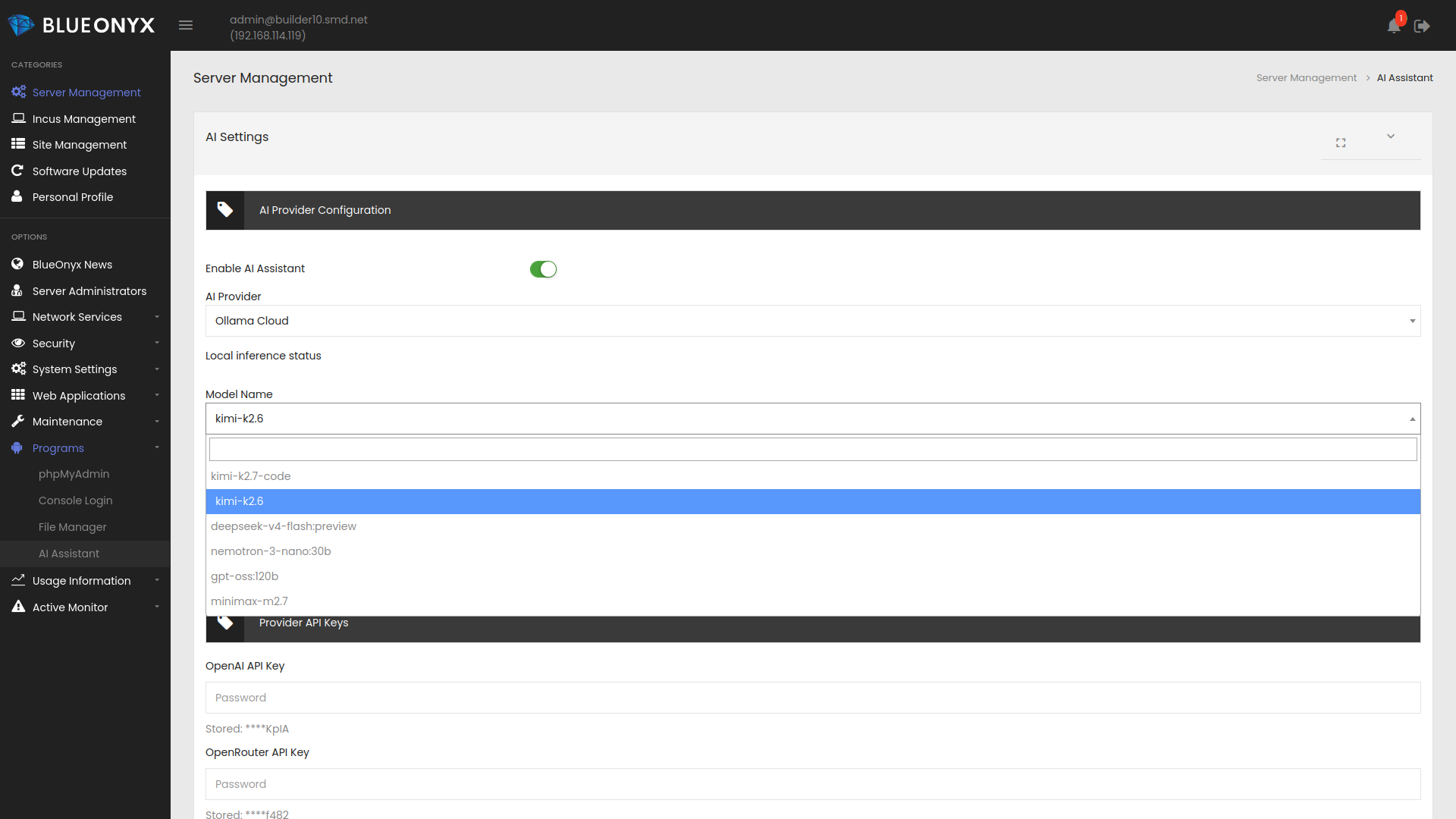
Remote providers include OpenAI, OpenRouter, Anthropic, Ollama Cloud, and custom OpenAI compatible or Ollama compatible endpoints. Administrators simply enter the API keys and select the preferred model from the provider.
Local provider support is based on llama.cpp and can use the packaged SmolLM2 model for on-box inference.
Can it run a local LLM on the server?
Yes. The module can use a local llama.cpp backend and a packaged GGUF model. Local inference is started on demand and will be stopped again when no longer needed.
Hardware support is intentionally broad, but local inference still depends on CPU capabilities, available memory, and the target operating system. On newer hardware it can work well. On older or smaller systems it may work but be slow. In those environments a remote provider is often the better option.
If your BlueOnyx server has a dedicated graphics card? The optional Vulcan support in llama.cpp will detect it and use it, allowing you to run more demanding LLM models locally.
What local model is included?
The packaged local model is SmolLM2-360M-Instruct-Q4_K_M.gguf. It is intended as a lightweight local model for basic tasks and environments where administrators want an on-box option.
What can it help with?
The BlueOnyx AI Assistant can help with tasks such as:
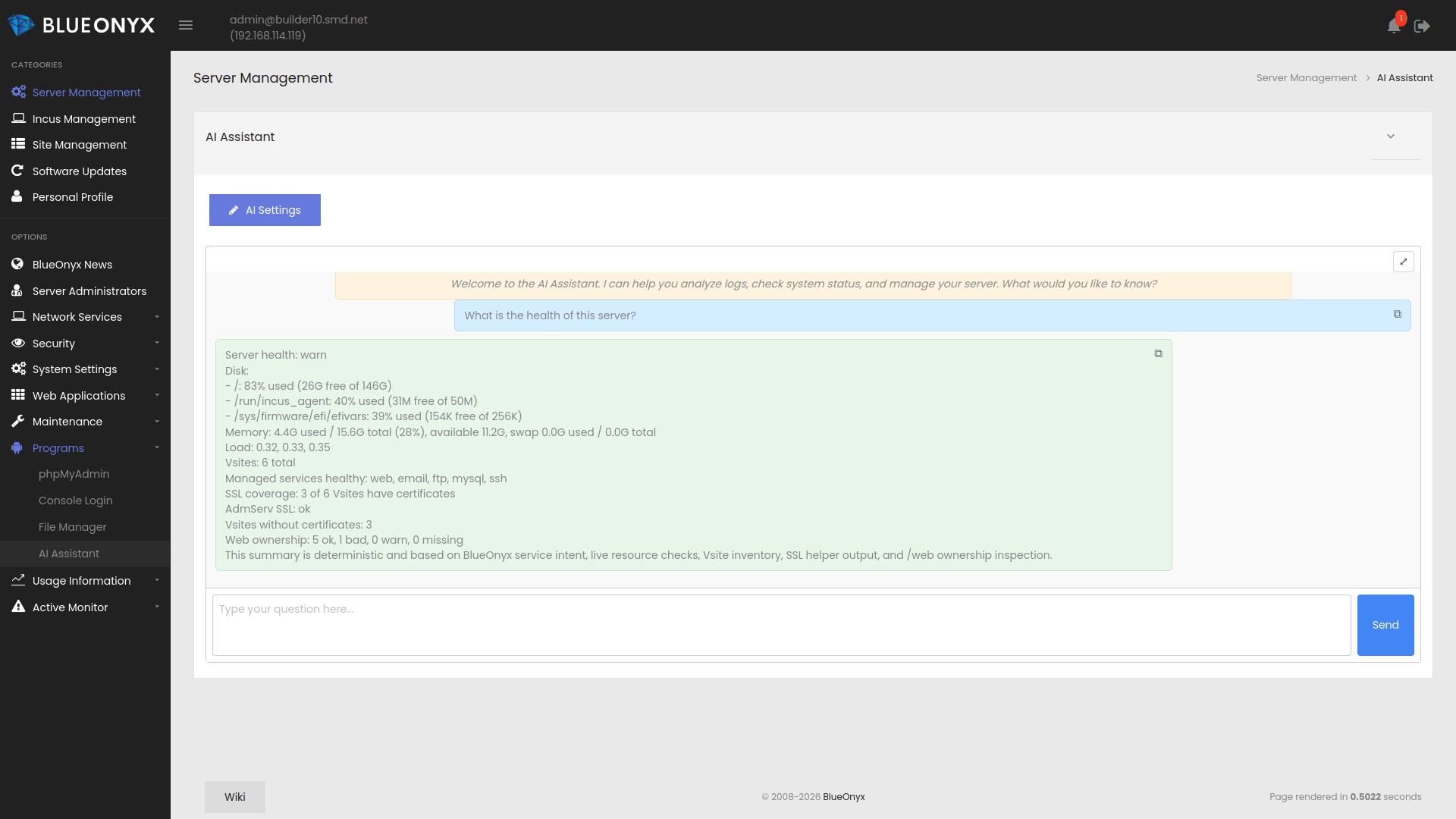
- Checking overall server health
- Listing Vsites and domain names
- Inspecting SSL certificate coverage and status
- Reviewing PHP-FPM state
- Reviewing web ownership issues under /web
- Inspecting memory, disk, load, and network state
- Searching and summarizing logs
- Reviewing mail flow and mail related health
- Highlighting suspicious or abusive outbound mail patterns
- Summarizing incidents and recent activity
- Helping administrators understand BlueOnyx specific runtime conditions
How does it inspect server state?
The module uses a combination of BlueOnyx aware helper scripts, read-only wrappers, structured diagnostic tools, and selective privileged helpers. Those tools are designed to gather relevant information in a predictable way instead of relying only on free-form model output.
This means the assistant can return grounded answers for many routine administrative questions, such as Vsite inventories, service health summaries, SSL checks, and system resource inspection.
Can it perform privileged actions?
Yes, but only in a controlled manner. The module uses BlueOnyx specific wrappers and explicit policy limits. Privileged functionality is not open ended. The goal is to allow useful administrative actions while keeping scope tight and predictable.
Does it know which services should be running?
Yes. The module can use BlueOnyx service intent and Active Monitor related data to determine whether a service should be considered active, disabled, or problematic. This is important because not every BlueOnyx system has the same services enabled.
Can it check SSL certificates?
Yes. The module includes SSL health checks for AdmServ and Vsites. It can report certificate presence, general status, and coverage. This helps identify whether a server or hosted sites are missing certificates or have SSL related issues.
Can it inspect hosted sites?
Yes. It can enumerate Vsites, report their domain names, and gather evidence about site health. That includes web ownership checks, SSL status, PHP-FPM state, and selected log evidence.
Can it analyze logs?
Yes. The module can inspect and search relevant logs through controlled helper tools. It can summarize findings, spot recurring errors, and support troubleshooting work without forcing the administrator to manually parse large log files first.
Can it help with mail diagnostics?
Yes. It includes mail related tools for health review, traffic summaries, and spam abuse style inspection. This helps identify delivery issues, suspicious sending patterns, and general mail server state.
How does local hardware support work?
The local llama.cpp build is intended to support a wide range of hardware by using runtime selected CPU backends. Where local inference is not suitable, the assistant can still be used with remote AI providers.
On EL10, the operating system itself raises the hardware floor because EL10 targets x86-64-v3. That limit comes from the platform, not just from the AI module.
Is local inference always recommended?
No. Local inference is available, but not always optimal. On older systems or servers with limited resources, an external provider is often the more practical choice. The module supports both approaches so administrators can choose what is appropriate.
Likewise: The included SmolLM2-360M-Instruct-Q4_K_M.gguf is “not exactly Mensa material”. It has very limited capabilties and intelligence. It is good enough to match user requests to a catalog of scripted tool calls and present the results, but it's deterministic and logical capabilities are limited.
How is LLM model intelligence taken into account?
Whenever you select a local or remote LLM model, the BlueOnyx AI Assistant runs some quick tests to determine the analytical capabilities of the selected LLM model. Depending on how clever and capable the LLM model is, the AI Assistant will remove guard rails and reduce the hand-holding of the LLM model. A small and dumb model like the included local SmolLM2 will be limited to run a fixed set of firmly scoped tools and tasks to make sure it doesn't hallucinate and presents acceptable repsonses.
More clever models get more analytical freedom, but even the most intelligent models can't do as they please on a BlueOnyx server.
What security measures keep the AI in check?
A rigid security architecture is in place which limits the AI Assistant to diagnosis, analysis and some limited non destructive actions.
- The AI service is not exposed publicly. It listens on loopback and is reached through the BlueOnyx GUI backend.
- Every request to the AI service requires a server-side service auth key, so local HTTP access without that key is rejected.
- The runtime runs as the unprivileged blueonyx_ai user, not as root.
- Dangerous actions are not available as free shell access. The generic privileged command path is disabled by default.
- If privileged actions are enabled at all, they are restricted to an explicit whitelist of wrapper scripts, not arbitrary commands.
- Sensitive wrappers run through sudo with tightly scoped allowed paths, not broad root access.
- Tool access is split into categories such as read-only, diagnostics, actions, and advanced. These can be enabled or disabled separately.
- Destructive or state-changing operations are confirmation-gated, so the AI cannot just execute them silently.
- Local file access is constrained. The AI is intentionally blocked from sensitive areas such as its own private runtime data and other high-risk paths.
- For many admin questions, the system uses deterministic helper tools instead of letting the model improvise commands.
- Local llama.cpp access is limited to a local on-demand service and is shut down again after idle time.
- There is dedicated audit logging for AI activity, so privileged use and suspicious behavior can be traced afterward.
What operating systems are supported?
The module is maintained for BlueOnyx 5210R, 5211R, and 5212R, covering EL8, EL9, and EL10 based platforms.
How is the module packaged?
The BlueOnyx AI Assistant is delivered as a standard BlueOnyx PKG that is available via NewLinQ. Internally it is split into multiple RPM components, including the GUI, service core, knowledge package, llama.cpp backend, and local model package.
How to install the BlueOnyx AI Assistant:
The BlueOnyx AI Assistant is available as BlueOnyx PKG for BlueOnyx 5210R, 5211R and 5212R - as well as via DNF from the regular BlueOnyx DNF repositories.
PKG install via NewLinQ:
The BlueOnyx AI Assistant is part of the following bundles of the BlueOnyx Shop:
- Free Bundle
- All Packages Bundle
- BlueOnyx Enterprise Edition (BOEE)
- BlueOnyx Professional Edition (BOPE)
- Aventurin{e} 6110R for BlueOnyx 5211R/5212R
The Free Bundle is of course available free of charge and only requires a shop account. Once one of the bundles that contains the BlueOnyx AI Assistant is linked to your server, you can find the PKG under "Software Updates" / "Third Party Software".
Manual installation via DNF:
It is also possible to just install the BlueOnyx AI Assistant via DNF as "root" from the command line of your BlueOnyx 5210R, 5211R or 5212R:
dnf install base-ai-*
Is the module free?
Yes. The BlueOnyx AI Assistant is available as a free PKG through NewLinQ or via DNF from the regular BlueOnyx DNF repositories.
Who should use it?
The module is useful for BlueOnyx administrators, hosting operators, and support staff who want faster access to diagnostics, better summaries of server state, and a more direct way to interact with BlueOnyx operational data.
Summary:
The BlueOnyx AI Assistant adds a practical AI interface to BlueOnyx that can use both local and remote models. It helps with diagnostics, health checks, Vsite inventory, SSL inspection, PHP-FPM review, log analysis, mail inspection, and guided server administration. It is meant to be useful, controlled, and grounded in BlueOnyx specific tooling rather than being just a generic AI front end.